
Square No Crop White Background Post for Profile1.6.1 - Google Play
You'll be able to see results in few seconds.
Publisher Description
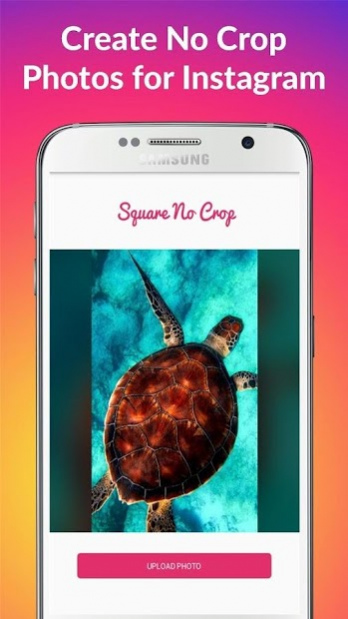


You're just 3 steps away from making your instagram account look much more interesting!
Just upload a photo, Choose background and Share on Instagram!
Using this photo editor you can post full sized pics that contains the entire photo.
For feed posts you want all of the photo to fit in a square size so it will fully fit and won't have to be cropped and for stories you also need the entire photo to fit in the image!
There are 4 options in the app, the first is the most common: White background or white border as many knows it for the no crop photo!
This is solving the issue by adding a white background behind the photo and keep the original photo aspect size!
The white border is easily added with one tap like all other effects!
The second effect are the colors. You can pick also black border or many other colors to be your picture background.
The third effect is the light blur background effect, it is a beautiful blur effect that uses the original photo to create a blurred beautiful background as border. It's awesome you should try this. Also with one tap.
The fourth effect is very similar to the second background type and it uses dark blur instead of light blur! If you like blurred borders in the square photos this blurred borders will be the best for you!
No need to hesitate anymore, this photo editor is making all of the work for you and let you make your insta profile and account much more interesting and unique!
So what are you waiting for?
Your insta posts will never be the same! Download Square No Crop White Blur Background for Instagram to make great posts in your account that people will never forget!
Main Features:
Feed Square No Crop Editor
Make square posts for your profile with no crop fast and easy! It will allow you to create full picture Instagram posts.
You can also rotate the photo to make it fit exactly.
White Background
Create white border posts that will keep the full photo inside the square no crop.
Colored Background
You can choose between many beautiful background colors for your insta no crop feed posts.
Blur Border
Design beautiful no crop entire photo posts with light blur border or dark blur border!
Story No Crop Editor
All the great features are also available to create no crop story for Instagram stories, post entire photo in your insta story with white border, colored border or blur border.
Quick and Easy Creation and Sharing
Create the square no crop feed posts or story without cropping!
Share the post or story directly to your Feed or Story from the app!
*********************************
Main Purposes of The App
*********************************
Allowing no crop for instagram photos to make square pictures / story pic fit for your insta account with a single tap.
Adding a white background to the picture while keeping a no crop version of the initial picture in front of the new background.
Also it offers colors, light blur background and dark blur to make even better no crop pictures with this great instagram cropper and sizer.
Disclaimer:
The app is a utility tool that is designed to help the users make posts for their Instagram accounts and the app isn't related or associated with Instagram Inc.
About Square No Crop White Background Post for Profile
The company that develops Square No Crop White Background Post for Profile is Inturnex Ltd. The latest version released by its developer is 1.6.1.
To install Square No Crop White Background Post for Profile on your Android device, just click the green Continue To App button above to start the installation process. The app is listed on our website since 2020-05-04 and was downloaded 0 times. We have already checked if the download link is safe, however for your own protection we recommend that you scan the downloaded app with your antivirus. Your antivirus may detect the Square No Crop White Background Post for Profile as malware if the download link to com.dbroyal.squarenocroplite is broken.
How to install Square No Crop White Background Post for Profile on your Android device:
- Click on the Continue To App button on our website. This will redirect you to Google Play.
- Once the Square No Crop White Background Post for Profile is shown in the Google Play listing of your Android device, you can start its download and installation. Tap on the Install button located below the search bar and to the right of the app icon.
- A pop-up window with the permissions required by Square No Crop White Background Post for Profile will be shown. Click on Accept to continue the process.
- Square No Crop White Background Post for Profile will be downloaded onto your device, displaying a progress. Once the download completes, the installation will start and you'll get a notification after the installation is finished.
Program Details
System requirements
Download information
Pricing
Version History
version 1.6.1
posted on 2020-05-04
There are some great improvements to the app in this update 👌👌
. Rotation available also in story creation 💪
. Create Story No Crop photos! You can now create photos that fit exactly to your story size so your stories will not be cropped any more while adding beautiful backgrounds to it: White, Colored, Light Blur or Dark Blur 💪
Hope you'll enjoy the new version 😄
version 1.6
posted on 2020-03-24
There are some great improvements to the app in this update 👌👌
. Create Story No Crop photos! You can now create photos that fit exactly to your story size so your stories will not be cropped any more while adding beautiful backgrounds to it: White, Colored, Light Blur or Dark Blur 💪
Hope you'll enjoy the new version 😄
version 1.5.1
posted on 2020-01-20
There are some great improvements to the app in this update 👌👌
. An option to rotate the photo, this should solve many users problems 💪
. A new option to choose background color from great colors library!!🌈
Hope you'll enjoy the new version 😄
Disclaimer
Official Google Play Link
We do not host Square No Crop White Background Post for Profile on our servers. We did not scan it for viruses, adware, spyware or other type of malware. This app is hosted by Google and passed their terms and conditions to be listed there. We recommend caution when installing it.
The Google Play link for Square No Crop White Background Post for Profile is provided to you by apps112.com without any warranties, representations or guarantees of any kind, so access it at your own risk.
If you have questions regarding this particular app contact the publisher directly. For questions about the functionalities of apps112.com contact us.
